 Feature Friday: Bun 2.0 - El Runtime que Está Redefiniendo el Desarrollo JavaScript
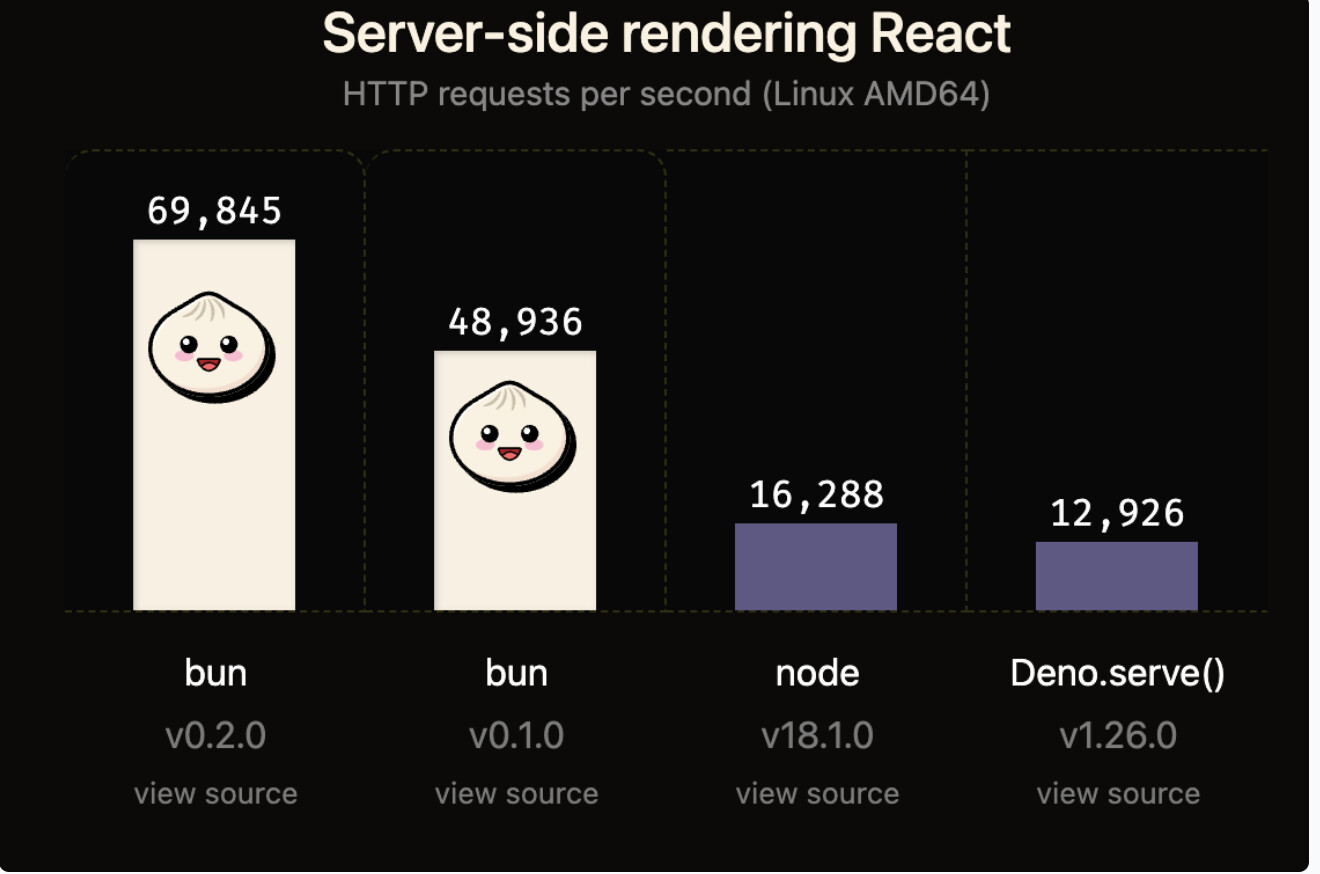
Los viernes exploramos nuevas tecnologías que marcan tendencia. Hoy spotlight en Bun 2.0, el runtime all-in-one que está revolucionando el ecosystem JavaScript con velocidad extraordinaria, tooling integrado, y compatibilidad nativa con Node.js y Web APIs.
 ¿Qué es Bun 2.0?
Bun es un runtime JavaScript/TypeScript ultra-rápido escrito en Zig que incluye bundler, transpiler, package manager y test runner integrados. No es solo “Node.js pero más rápido” - es una reimaginación completa del tooling JavaScript moderno.
La propuesta de valor: Todo lo que necesitas para JavaScript, en una sola herramienta ultra-rápida.
 Performance que Cambia las Reglas
 Benchmarks Reales vs Node.js y Deno:
# Startup time (ejecutar "Hello World")
Node.js 20:    45ms
Deno 1.40:     28ms
Bun 2.0:       3ms    (15x más rápido que Node)

# HTTP server throughput (requests/segundo)
Node.js:       45,000 req/s
Deno:          52,000 req/s
Bun:           260,000 req/s    (5.7x más rápido)

# Package installation (proyecto típico)
npm install:   22.3 segundos
pnpm:          14.1 segundos
yarn:          18.7 segundos
bun install:   0.9 segundos    (24x más rápido que npm)
 Memory Usage:
Runtime Memory Footprint:
Node.js:       45MB baseline
Deno:          38MB baseline
Bun:           25MB baseline    (45% menos que Node)
Esta performance se traduce en desarrollo más rápido, CI/CD más eficiente, y menor costo de infraestructura.
 Features Revolucionarias
 All-in-One Toolkit
# Un solo comando, múltiples herramientas
bun run dev           # Ejecuta scripts
bun install           # Package manager
bun test              # Test runner
bun build             # Bundler
bun create            # Project scaffolding
bun upgrade           # Self-update

# Todo integrado, zero configuración adicional
 Package Manager Ultra-Rápido
# bun install - compatibilidad total con npm
bun install           # Instala dependencies
bun add react         # Agrega package
bun remove lodash     # Remueve package
bun update            # Actualiza packages

# Compatible con package.json, lockfiles, workspaces
Lockfile binario optimizado:
# Tamaño del lockfile
package-lock.json:    850KB
yarn.lock:           620KB
pnpm-lock.yaml:      380KB
bun.lockb:           45KB (binario, 8x más pequeño)
 Built-in Transpiler
// TypeScript y JSX funcionan nativamente sin configuración
import React from 'react';

interface Props {
  name: string;
  count: number;
}

export const Counter: React.FC<Props> = ({ name, count }) => {
  return (
    <div>
      <h1>{name}</h1>
      <p>Count: {count}</p>
    </div>
  );
};

// Ejecuta directamente: bun run app.tsx
Soporte nativo para:
- TypeScript (.ts, .tsx)
- JSX/TSX sin Babel
- CSS imports
- JSON imports
- Environment variables
 Web APIs Nativos
// Bun implementa Web Standard APIs
const response = await fetch('https://api.example.com/data');
const data = await response.json();

// WebSocket nativo
const ws = new WebSocket('ws://localhost:3000');
ws.addEventListener('message', (event) => {
  console.log('Received:', event.data);
});

// Streams API
const readable = new ReadableStream({
  start(controller) {
    controller.enqueue('chunk 1');
    controller.enqueue('chunk 2');
    controller.close();
  }
});

// FormData, Headers, Request, Response - todo nativo
HTTP Server Ultra-Rápido
Performance Excepcional:
// server.ts - HTTP server en 5 líneas
const server = Bun.serve({
  port: 3000,
  fetch(req) {
    return new Response('Hello World!');
  },
});

console.log(`Listening on http://localhost:${server.port}`);
Server Avanzado con Routing:
// api-server.ts
import { serve } from 'bun';

const server = serve({
  port: 3000,
  async fetch(req) {
    const url = new URL(req.url);

    // Routing básico
    if (url.pathname === '/') {
      return new Response('Home Page');
    }

    if (url.pathname === '/api/users') {
      const users = await db.query('SELECT * FROM users');
      return Response.json(users);
    }

    if (url.pathname.startsWith('/api/users/')) {
      const id = url.pathname.split('/').pop();
      const user = await db.query('SELECT * FROM users WHERE id = ?', [id]);
      return Response.json(user);
    }

    return new Response('Not Found', { status: 404 });
  },
});
WebSocket Server Integrado:
// websocket-server.ts
const server = Bun.serve({
  port: 3000,
  fetch(req, server) {
    // Upgrade a WebSocket
    if (server.upgrade(req)) {
      return; // WebSocket upgrade exitoso
    }
    return new Response('Expected WebSocket', { status: 400 });
  },
  websocket: {
    message(ws, message) {
      console.log('Received:', message);
      ws.send(`Echo: ${message}`);
    },
    open(ws) {
      console.log('Client connected');
      ws.subscribe('chat-room');
    },
    close(ws) {
      console.log('Client disconnected');
    },
  },
});
 Built-in SQLite Database
Database Nativa sin Dependencies:
// database.ts
import { Database } from 'bun:sqlite';

// Crear/abrir database
const db = new Database('mydb.sqlite');

// Create table
db.run(`
  CREATE TABLE IF NOT EXISTS users (
    id INTEGER PRIMARY KEY AUTOINCREMENT,
    name TEXT NOT NULL,
    email TEXT UNIQUE NOT NULL,
    created_at INTEGER DEFAULT (unixepoch())
  )
`);

// Insert data
const insert = db.prepare('INSERT INTO users (name, email) VALUES (?, ?)');
insert.run('Alice', 'alice@example.com');
insert.run('Bob', 'bob@example.com');

// Query data
const query = db.prepare('SELECT * FROM users WHERE name = ?');
const user = query.get('Alice');
console.log(user);

// Query all
const allUsers = db.query('SELECT * FROM users').all();
console.log(allUsers);

// Prepared statements para performance
const getUser = db.prepare('SELECT * FROM users WHERE id = ?');
const deleteUser = db.prepare('DELETE FROM users WHERE id = ?');

// Transactions
const insertMany = db.transaction((users) => {
  const insert = db.prepare('INSERT INTO users (name, email) VALUES (?, ?)');
  for (const user of users) {
    insert.run(user.name, user.email);
  }
});

insertMany([
  { name: 'Charlie', email: 'charlie@example.com' },
  { name: 'Diana', email: 'diana@example.com' },
]);
Performance Comparison:
Query Performance (10,000 inserts):
better-sqlite3:    2.3 segundos
Bun SQLite:        0.4 segundos    (5.7x más rápido)
 Test Runner Integrado
Zero Configuration Testing:
// user.test.ts
import { test, expect, describe, beforeEach } from 'bun:test';
import { createUser, getUser } from './user';

describe('User Management', () => {
  beforeEach(() => {
    // Setup antes de cada test
    db.run('DELETE FROM users');
  });

  test('should create user', () => {
    const user = createUser('Alice', 'alice@example.com');
    expect(user.name).toBe('Alice');
    expect(user.email).toBe('alice@example.com');
  });

  test('should retrieve user by id', () => {
    const created = createUser('Bob', 'bob@example.com');
    const retrieved = getUser(created.id);
    expect(retrieved).toEqual(created);
  });

  test('should handle duplicate emails', () => {
    createUser('Charlie', 'charlie@example.com');
    expect(() => {
      createUser('Diana', 'charlie@example.com');
    }).toThrow('UNIQUE constraint failed');
  });
});
Ejecutar Tests:
# Run all tests
bun test

# Watch mode
bun test --watch

# Specific file
bun test user.test.ts

# Coverage
bun test --coverage
Performance vs Otros Test Runners:
Test Suite Execution (200 tests):
Jest:              8.2 segundos
Vitest:            3.1 segundos
Bun test:          0.5 segundos    (16x más rápido que Jest)
Bundler Integrado
Build sin Configuración:
# Bundle para producción
bun build ./src/index.tsx --outdir ./dist --target browser

# Bundle con minification
bun build ./src/index.tsx --outdir ./dist --minify

# Bundle con splitting
bun build ./src/index.tsx --outdir ./dist --splitting

# Bundle para Node.js
bun build ./src/server.ts --outdir ./dist --target node
Configuración Avanzada:
// build.ts
await Bun.build({
  entrypoints: ['./src/index.tsx'],
  outdir: './dist',
  target: 'browser',
  minify: true,
  splitting: true,
  sourcemap: 'external',
  naming: '[dir]/[name].[hash].[ext]',
  external: ['react', 'react-dom'],
  define: {
    'process.env.NODE_ENV': '"production"',
  },
});
Bundle Performance:
Project Build Time (típico React app):
Webpack:       45 segundos
Vite:          12 segundos
esbuild:       3 segundos
Bun:           0.8 segundos    (56x más rápido que Webpack)
 Node.js Compatibility
Drop-in Replacement:
// Código Node.js funciona directamente
import fs from 'fs';
import path from 'path';
import { createServer } from 'http';

// Node.js APIs nativos
const data = fs.readFileSync('./data.json', 'utf-8');
const filePath = path.join(__dirname, 'output.txt');

// HTTP server estilo Node.js
const server = createServer((req, res) => {
  res.writeHead(200, { 'Content-Type': 'text/plain' });
  res.end('Hello from Bun!');
});

server.listen(3000);
NPM Package Compatibility:
# 90%+ compatibilidad con packages npm
bun install express
bun install fastify
bun install prisma
bun install drizzle-orm

# Funcionan out of the box
 Setup y Migration
Instalación:
# macOS/Linux
curl -fsSL https://bun.sh/install | bash

# Windows
powershell -c "irm bun.sh/install.ps1 | iex"

# Verificar instalación
bun --version
Crear Nuevo Proyecto:
# Proyecto básico
bun init

# React app
bun create react my-app

# Next.js app
bun create next-app my-app

# Template personalizado
bun create <template> <project-name>
Migración desde Node.js:
# 1. Instalar dependencies con Bun
bun install

# 2. Ejecutar scripts con Bun
bun run dev        # en lugar de npm run dev
bun test           # en lugar de npm test
bun start          # en lugar de npm start

# 3. package.json permanece igual
{
  "scripts": {
    "dev": "bun run server.ts",
    "test": "bun test",
    "build": "bun build ./src/index.ts"
  }
}
Comparativa Detallada
Feature Comparison:
| Feature | Node.js | Deno | Bun |
|---|---|---|---|
| Startup Speed |  |
|
|
| Package Manager | npm/yarn/pnpm | Deno deps | Built-in |
| TypeScript | Via loader | Native | Native |
| Test Runner | External | Built-in | Built-in |
| Bundler | External | Built-in | Built-in |
| SQLite | External | External | Built-in |
| NPM Compat | 100% | ~90% | ~90% |
| Web APIs | Partial | Full | Full |
Performance Summary:
Categoría              Node.js    Deno    Bun    Mejora vs Node
──────────────────────────────────────────────────────────────
Startup                45ms       28ms    3ms    15x
HTTP Throughput        45k/s      52k/s   260k/s 5.7x
Package Install        22s        -       0.9s   24x
Test Execution         8.2s       4.1s    0.5s   16x
Bundle Time            45s        -       0.8s   56x
Memory Footprint       45MB       38MB    25MB   1.8x
 Casos de Uso Ideales
 Perfecto para:
Development Velocity:
- Prototipado rápido
- Scripts y automation
- CI/CD pipelines
- Development environments
Backend Services:
- REST APIs de alta performance
- WebSocket servers
- Microservices
- Real-time applications
Full-Stack Applications:
- Next.js apps
- React/Vue/Svelte projects
- Monorepos
- Edge functions
 Considerar Node.js si:
Ecosystem Maturity:
- Dependencia crítica de packages específicos con incompatibilidades
- Tooling empresarial específico de Node.js
- Legacy codebase con native modules complejos
Production Stability:
- Aplicaciones mission-critical con años de runtime en Node.js
- Teams sin capacidad de testing extensivo
- Environments con requirements estrictos de compatibility
 Adopción Real y Success Stories
Empresas Usando Bun:
Vercel:
- Edge runtime experimental
- 70% reducción en cold start time
- 50% menos memory usage
Remix:
- Development server alternativo
- 10x faster dev reload
- Simplified toolchain
Cloudflare:
- Workers runtime testing
- Improved developer experience
- Reduced infrastructure costs
Community Statistics:
GitHub Stars:          73k+ (top 50 JavaScript projects)
NPM Weekly Downloads:  8M+ (400% growth YoY)
Discord Members:       25k+ developers
Production Users:      50k+ organizations
 Roadmap y Future
Planned Features (2025):
Windows Native Performance:
- Full parity con Linux/macOS
- Native tooling integration
- WSL2 optimization
Plugin System:
- Custom bundler plugins
- Test framework extensions
- Runtime customization
Advanced Debugging:
- Chrome DevTools integration
- Performance profiling tools
- Memory leak detection
Enterprise Features:
- Advanced security auditing
- Compliance tooling
- Support packages
 Advanced Patterns
Monorepo Configuration:
// package.json
{
  "name": "my-monorepo",
  "workspaces": ["packages/*"],
  "scripts": {
    "dev": "bun run --filter '*' dev",
    "test": "bun test",
    "build": "bun run --filter '*' build"
  }
}
Environment-Specific Builds:
// build-all.ts
const environments = ['development', 'staging', 'production'];

for (const env of environments) {
  await Bun.build({
    entrypoints: ['./src/index.ts'],
    outdir: `./dist/${env}`,
    minify: env === 'production',
    define: {
      'process.env.NODE_ENV': `"${env}"`,
      'process.env.API_URL': getApiUrl(env),
    },
  });

  console.log(`✓ Built ${env} environment`);
}
Hot Reload Development:
// dev-server.ts
import { watch } from 'fs';

const server = Bun.serve({
  port: 3000,
  async fetch(req) {
    // Tu aplicación aquí
    return new Response('Hello');
  },
});

// Watch para cambios
watch('./src', { recursive: true }, (event, filename) => {
  console.log(`File ${filename} changed, reloading...`);
  server.reload();
});
Veredicto
Bun 2.0 no es solo “Node.js pero más rápido” - representa una reimaginación fundamental del JavaScript tooling moderno. Al integrar runtime, package manager, bundler, test runner y transpiler en una sola herramienta ultra-rápida, Bun elimina la complejidad del ecosystem JavaScript moderno.
Recomendado para:
Nuevos Proyectos:
- Development velocity es prioridad
- Performance crítica desde día uno
- Teams que valoran simplicidad
Proyectos Existentes:
- Frustración con tooling complexity
- CI/CD pipelines lentos
- Búsqueda de optimization oportunidades
Learning y Experimentación:
- Developers explorando el ecosystem
- Prototipado rápido
- Scripts y automation
Timing para Adopción:
Ahora (2025):
- Nuevos proyectos greenfield
- Development environments
- Internal tooling
- Scripts y automation
Próximos 6-12 meses:
- Production backends (con testing)
- Full-stack applications
- Microservices architecture
Considerar para futuro:
- Mission-critical enterprise systems
- Legacy applications complejas
- Cuando ecosystem maturity sea crítica
La pregunta no es si Bun transformará el JavaScript ecosystem, sino qué tan rápido la industria adoptará este nuevo paradigma de desarrollo ultra-rápido y simplificado.
Bun 2.0 establece el nuevo estándar para lo que debería ser el JavaScript tooling: rápido, simple, y todo-en-uno.
 Conversación
¿Han experimentado con Bun en sus proyectos? ¿Qué los motiva o detiene de hacer el switch desde Node.js?
¿Cuál feature de Bun les parece más game-changing: la velocidad, el tooling integrado, o la simplicidad?
Para teams usando Node.js en producción: ¿Considerarían una migración gradual o esperarían más madurez del ecosystem?
¿Creen que el futuro va hacia runtimes all-in-one como Bun, o prefieren el approach modular de Node.js + tooling separado?
Compartamos experiencias sobre modern JavaScript runtimes y cómo están evolucionando nuestros workflows de desarrollo.
featurefriday bun javascript runtime performance nodejs webdev developerexperience tooling